Data Connections
Data in records can depend on other records. For this purpose, two types of variables are used in formulas:
Join and Look back.Join
Join is a way to get data from another table. Imagine you have two tables: "Clients" and "Orders". Join allows you to automatically see the client name in the Orders table — without manually copying data. Like VLOOKUP in Excel, but simpler.
Data is taken from another table. Using filter and sorting, the record that will be selected for the variable value is determined.
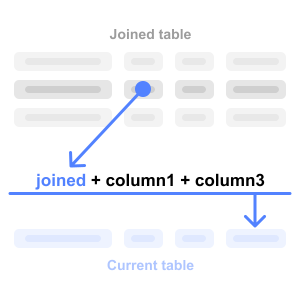
Join reading level limitations:
- All tables in the chain can use join variables
- Tables in the join chain must not be cyclically dependent (e.g., a→b→c→a) — in this case, values for cyclically dependent tables will be empty
Example:
The "Orders" table contains a
client_id column. Using Join, you can create a client_name variable that automatically pulls the client name from the "Clients" table by the filter id = client_id.Look back
Look back is a way to "look back" and get a value from the previous record. For example: calculate the difference between today's and yesterday's stock balance. Or show the price change compared to the previous period.
This type of variables is mainly needed for comparing values between records in the same table.
For example, there are two columns
Volume and Difference. To calculate the value of the Difference column, you need to add a Look back variable prev_volume with an offset of 1. Then apply the formula Volume - prev_volume.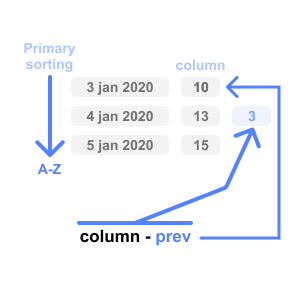
For Look back to work correctly, you need to define a correct primary sorting.
Example:
Table "Stock balance" with columns
Date and Quantity. Add a Look back variable prev_count with offset 1, and in the Change column use the formula Quantity - prev_count. Now you can see how much the balance changed compared to the previous record.Example for workouts:
Table "Workouts" with columns
Date, Exercise and Weight. Add a Look back variable prev_weight with offset 1, and in the Progress column use the formula Weight - prev_weight. Now you can see how much the working weight increased compared to the previous workout.📌 Next step: Data Filtering →
📌 Also useful: Columns | System Variables