Table Columns
Each column describes the nature of the stored data. The following parameters are available for columns.
Name
Displayed in the table, filters, and other places in the system when working with records.
Data Type
The data type determines the data storage format, how it is displayed in the table, and how it is processed during various operations.
Symbol
Available for
Number data typeA symbol that will be added after the number, indicating the unit of measurement.
Default Value
The value that will be added by default when creating new records.
If the value is not specified, it may be added automatically when creating a record depending on the column's data type and if the
Autofill parameter is enabled.When changing the default value, if autofill is enabled, the value will be written to all records where data is missing.
If you need to skip filling in data, you should disable autofill when saving the table schema with the new default value. After saving, autofill can be enabled again and the table schema can be saved.
Allowed Values
A list of values available for filling. When working in the table, you can easily select an available value. This parameter does not limit the use of other values in the column.
Formula
A value that will be calculated during table reading. The formula is applied only if no explicit value is specified for the column in the record.
Formulas can use values from other columns and values from the current column's variables.
Autofill
If this parameter is enabled, when manually creating a record in the table, the service will attempt to generate an appropriate value. For example, the current date or time. If a filter is applied to the table, the new value will be generated taking this filter into account.
This parameter also affects data filling when updating the
Default Value in the schema.Number Rounding
If the parameter is specified, the number will be rounded to the specified number of decimal places.
Be careful when calculating. For example, a column with financial indicators may use rounding to two decimal places. If such a column has a value of
1.07, and this value is divided by 3, the result will be 0.36. This may be incorrect, since 0.36 * 3 = 1.08.This happens because the number obtained after division was rounded to 2 decimal places with rounding to significant digits.
Join, Look back VariablesPrimary Sorting
The primary order of data depends on the primary sorting. Primary sorting also affects the operation of
Look back variables.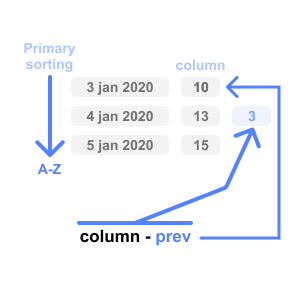
📌 Next step: Data Types →
📌 Also useful: Data Connections | System Variables